
Senior School · Grade 10-12 · CBE
Run Senior School on each learner's subject combination
From the Ministry's placement list to the elective groups to the KCBE record, QXP holds each learner's combination once and builds the groups, the exams and the results on it.
What you are dealing with
What this stage asks of a school
The Ministry's placement list is a spreadsheet, and somebody has to turn it into learner records.
The electives will not fit one timetable. I need groups I can run, and to see which ones are too small.
Learners study different subjects now, so a class list and a mark sheet are no longer the same thing.
Parents ask where a pathway leads, and I answer from memory.
What QXP runs at this stage
Combinations, groups, exams and results
Each of these is in QXP today. They share one learner record, so a combination entered once is the one the groups, the exams and the results use.
Your Senior School offer, on record
Record the pathways and combinations your Ministry licence covers, in settings. Each learner's combination is checked against that offer.
Subject combinations, per learner
Every learner holds a combination. Import the Ministry placements from a CSV file, and roll the combinations over to the next term instead of keying them again.
Elective blocks and teaching groups
Set up option blocks and teaching groups. Propose a group, accept it, or auto-fill it from learners' choices, with a campus picker for a school on more than one campus.
The group follows into the classroom
A teaching group carries through to the scheme of work, lesson plans, lessons, homework and the record of work.
Approved books, linked in
Approved books are linked into schemes of work, lesson plans, lessons and homework.
Exams for a group, or for everyone
Set an exam for one teaching group, or convert an elective into a common paper when the whole stage sits the same one.
National exams, in the right subjects
Import the roster and results for the national exams: KCBE, and KPSEA and KJSEA too. KCBE results are recorded only in the subjects in each learner's own combination, and Grade 12 completers stay on the roster once they have finished.
Pathway outlook, per grade, stream or group
Counts of how many learners lean to each pathway. Any group of fewer than five is suppressed, so a small group cannot point to one child.
The outlook, for families to open
The programme, the university route and the careers it opens, for Grades 7 to 12. Parents and learners can open it themselves.
Admission forms that show your combinations
The admission form shows the combinations your school offers.
Still running Form 3 and Form 4? QXP runs 8-4-4 beside CBE until the last KCSE.
On one school record
The scheme, the lesson and the mark sit with the combination
Senior School is not a separate system. The scheme of work, the lesson plan, the register and the mark are on the same record as the learner's combination and teaching group.
- Schemes of work by week, strand and sub-strand
- The author and Published status of each scheme
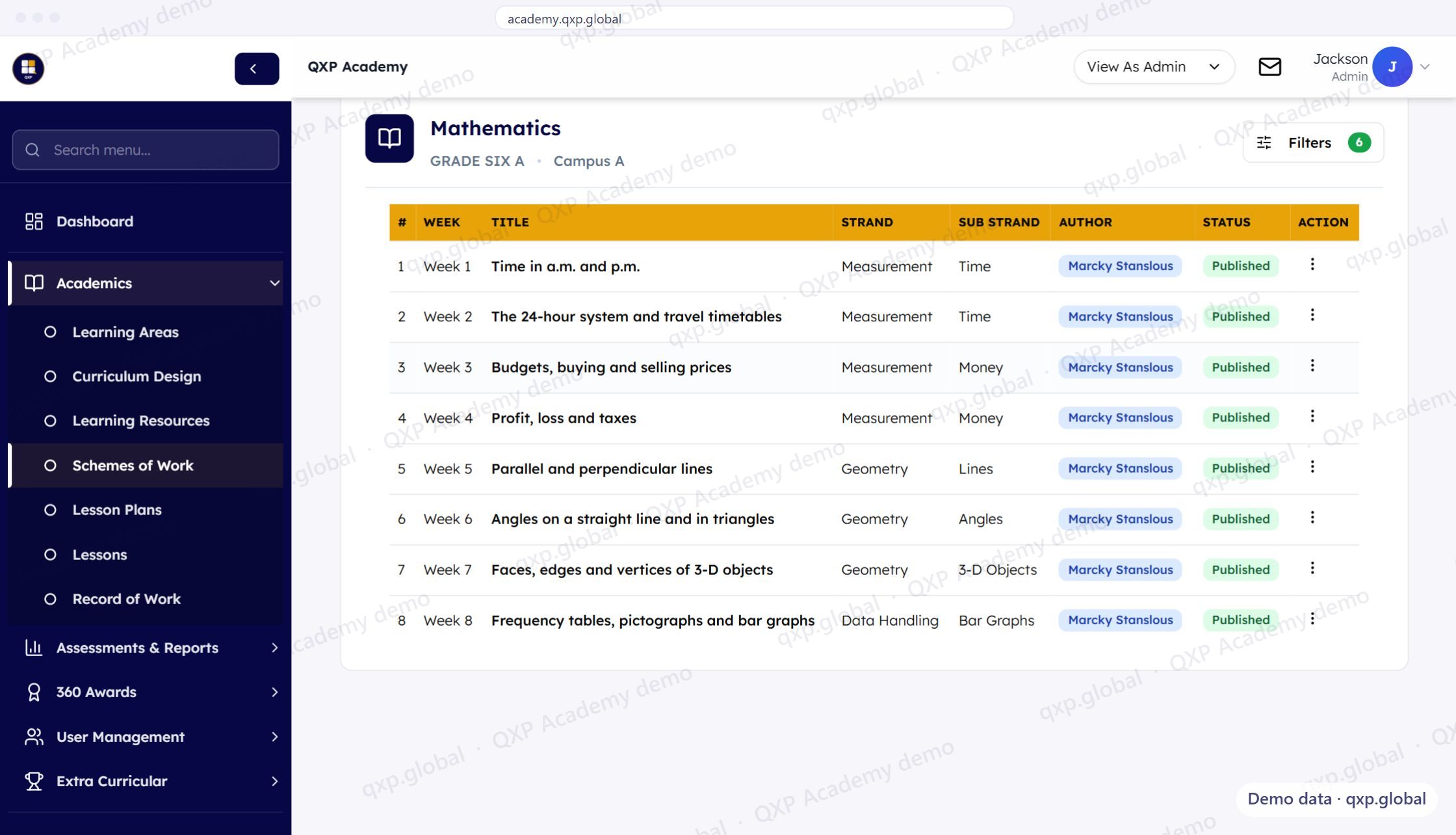
QXP Academics, shown with demo data. Ask us to show you the combination and elective-group screens in a demo.
The question behind the question
Before you commit
We are still running 8-4-4 in the upper forms.
QXP runs both. Form 3 and Form 4 stay on 8-4-4 until the last KCSE, and the CBE grades run beside them on the same system.
Teachers will not take on another system.
The teacher workspace follows the planning teachers already do: the scheme, the lesson plan, the register, the mark. It is not extra admin on top.
Senior School is part of CBE on QXP, and Pre-primary (PP1-PP2), Primary (Grade 1-6) and Junior School (Grade 7-9) sit on the same school record.
See Senior School on a seeded sample school
Book a demo. We show your Grade 10 set-up on a fully seeded sample school, not on slides.